SMS Terms
Last updated: March 13, 2026
Program Name
SigmaSnap Signal Alerts
SigmaSnap sends options trading signal alerts and trade exit notifications via SMS to subscribers who explicitly opt in.
- Message frequency: 1–5 messages per trading day
- Message and data rates may apply
- Reply STOP to cancel, HELP for help
- Carrier support is not available for all carriers
- Contact: support@sigmasnap.net
How to Opt In
Users must:
- Create an account at app.sigmasnap.net
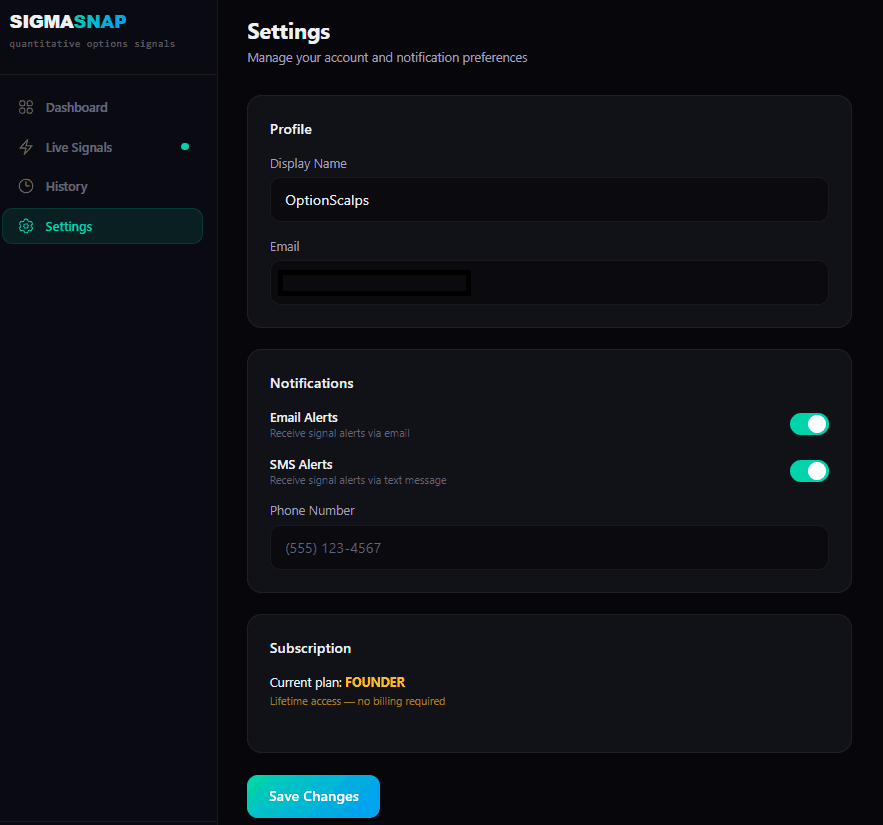
- Navigate to Settings at app.sigmasnap.net/dashboard/settings
- Enter their phone number in the Phone Number field
- Toggle the SMS Alerts switch to ON
The SMS Alerts toggle is OFF by default — no messages are sent unless the user actively enables it. SMS is only available to paid Pro and Founder plan subscribers.
Opt-In Screenshot
Below is a screenshot of the opt-in form as it appears in the SigmaSnap dashboard Settings page:
How to Opt Out
Users can opt out of SMS notifications at any time by:
- Toggling SMS Alerts to OFF in their Settings
- Replying STOP to any message received from SigmaSnap